
Frequently Asked Questions
General
What is a Moon Visa® Prepaid Card?
The Moon Visa® Prepaid Card is a virtual card that can be loaded with cryptocurrency.
Crypto is converted to USD the moment it's loaded to the card and funds are immediately available to spend everywhere Visa cards are accepted online in the US. Restrictions Apply: http://paywithmoon.com/terms-conditions
How do virtual cards work?
Virtual cards are just like regular cards, except there is no physical plastic. By entering virtual card details where you would normally input your credit or debit card details, you can complete purchases without giving out your personal card details.
Where can I shop/pay with Moon Visa® Prepaid Cards?
Moon enables you to shop/pay with your crypto everywhere Visa cards are accepted online in the US. Some restrictions apply, please see the terms and conditions for details.
How do I fund a Moon Visa® Prepaid Card?
You can fund a virtual card with your Coinbase account or a Lightning Network enabled wallet.
Do I have to apply for a Moon Visa® Prepaid Card?
No, there is no application process to create or use a Moon Visa® Prepaid Card.
Do I have to use a Moon Visa® Prepaid Cards to pay with Moon?
If you want to spend your crypto through Moon, you must create a Moon Visa® Prepaid Card and fund it with crypto.
What billing name and address do I enter when paying with a Moon Visa Prepaid® card?
When paying with a Moon Visa® Prepaid Card, you should use the name associated with your Moon account. You can use any billing address you want.
How do I delete a virtual card?
If you made an error in setting the amount on a card or have decided to no longer use the card, you can click the "delete" button under the card after which you will receive a credit to your Moon account for any unspent amount.
How long is a Moon Visa® Prepaid Card valid?
Moon Visa® Prepaid Cards must be used within 60 days of creation.
Can I combine two cards or transfer a balance from one to another?
No; but you can delete the cards in order to receive credit to your Moon account for any unspent amounts. That credit can be used towards the purchase of another Moon card in the amount that you need.
Are there any fees?
Moon does not charge fees for purchasing cards, having an account or making purchases with cards. Moon reserves the right to charge fees for certain activities to mitigate abusive behavior.
Refunds and Returns
What happens if I return an item?
If you return an item to a merchant, the purchase balance will be refunded to the card originally used to make the purchase.
I made a mistake when creating a card. Can I receive a refund?
Yes. Click "Delete" under the card to delete the card and receive a credit to your Moon account. Credit can be used towards the purchase of another card.
What happens if I don't spend the full balance on a card?
Don't worry! Click "Delete" under the card to delete the card and receive a credit to your Moon account for any unspent amount. Credit can be used towards the purchase of another card.
What if I want a refund in crypto?
All off platform refunds are processed in Bitcoin. The amount refunded will be equal to the unspent value of the card converted to Bitcoin at the moment of refund minus network and processing fees. Refund requests will be processed within 5 business days of receipt.
Coinbase
How do I change my daily limit?
1. Open Moon by clicking the Moon icon in your browser’s toolbar where your active extensions appear.

2. Enter the settings menu by clicking the gear icon in the upper right hand corner of Moon.
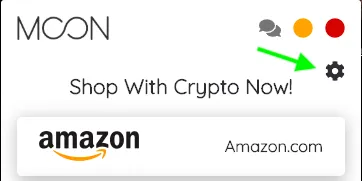
3. Under "Settings" click "Connect to Coinbase".
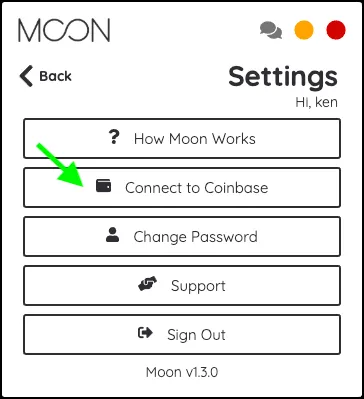
4. Select "Reconnect Coinbase". If you haven't connected Coinbase to Moon yet, select "Connect Coinbase".
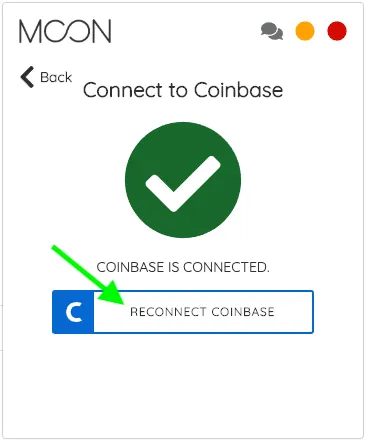
5. When connecting your Coinbase account with Moon, Coinbase will ask you to authorize Moon to access your Coinbase account.
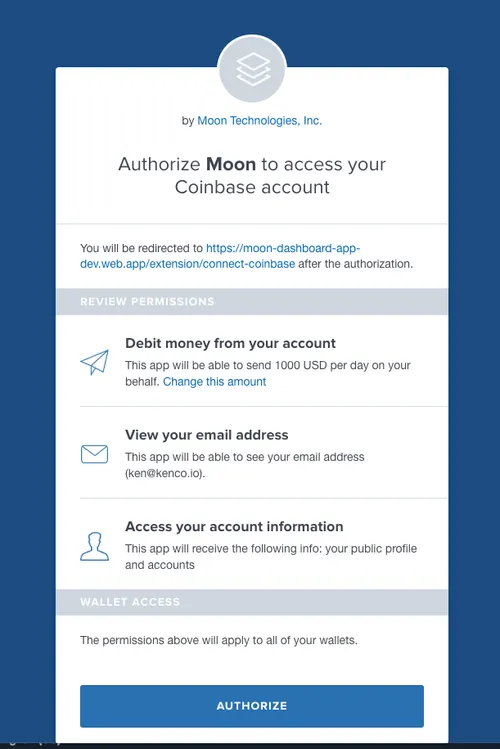
6. Under "Debit money from your account" click "Change this amount".
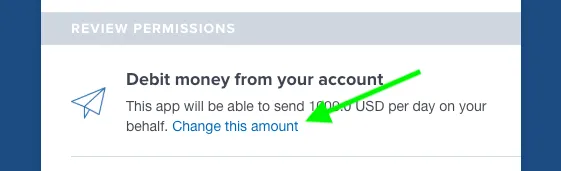
7. Set the daily limit that you would like to authorize. This is the maximum amount you’ll be able to spend in Moon each day.
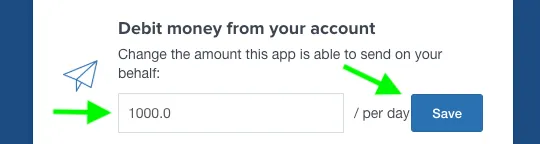
8. Click "Save" and continue to authorize Moon to access your Coinbase account.
How do I change my two-factor authentication settings?
1. Log in to Coinbase.
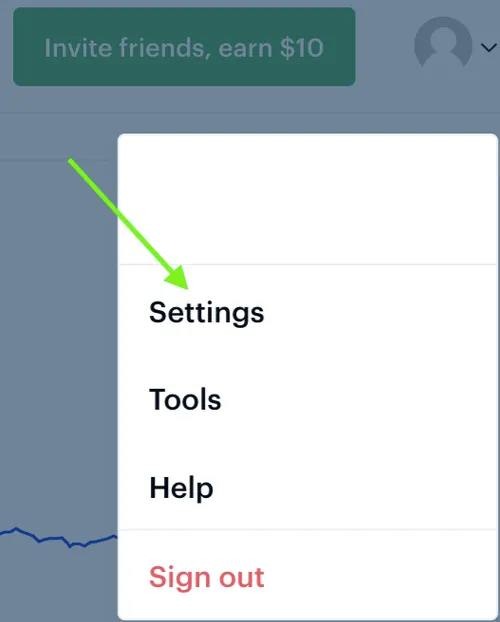
2. Go to "Settings".
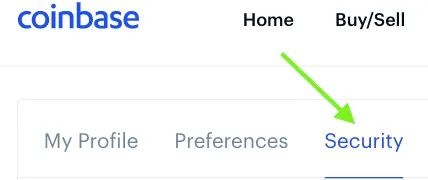
3. Click "Security".
4. Select which method of 2-step security you prefer. We recommend selecting "Authenticator App".
Note: You will not be able to make purchases from your Coinbase account if you select "Security Key" as your 2-step verification method.
.webp)
5. At the bottom of the page, choose whether to enable 2-step verification on transactions. We recommend you enable 2-step verification for any amount of cryptocurrency for added security.
.webp)
6. Be sure to click "Save" before you exit this screen..
How do I revoke Moon’s permissions to my Coinbase account?
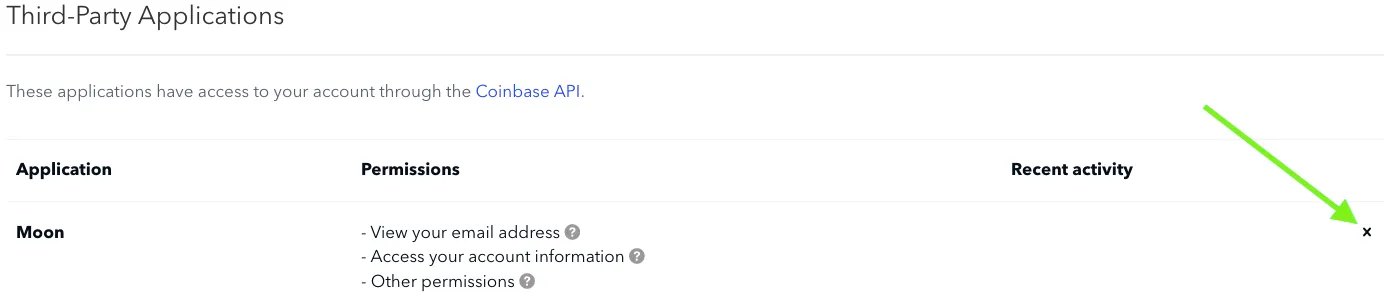
NOTE: After revoking Moon’s permissions you will no longer be able to make purchases in Moon from your Coinbase wallets.
1. Log in to Coinbase.
2. Go to "Settings".
3. Click "Account Activity"..
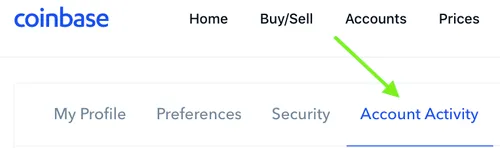
4. Under "Third-Party Applications", find Moon. Then click on the "x" to revoke Moon’s permissions from your Coinbase account. There may be multiple instances of Moon, in which case you will want to click "x" next to all of them to fully revoke Moon’s permissions.
Restrictions
Are there any restrictions when using a Moon Visa® Prepaid Card?
Some types of purchases are restricted. See the list of restricted merchant categories elsewhere in this FAQ. Moon Visa® Prepaid Cards can also not be used at non-US based merchants.
What types of purchases are restricted?
You cannot use Moon or the Moon Card for the following purchases: wires or money orders; direct marketing services; security brokers/dealers and associated activities; dating/escort services; massage services; betting, track, casino, or lotto; government-licensed online gambling, including casinos and online casinos (online gambling); horse/dog racing or other government licensed racing; non-sport internet gaming; internet gaming betting; cash disbursement, manual or automated; financial institution cash, automated or manual; and outbound telemarketing merchants and services. Additionally, Moon may restrict certain purchase types to prevent misuse of the services as set out in our terms and conditions.
Are there any limits on purchases made with Moon Visa® Prepaid Cards?
Each virtual card can hold a maximum of $1000 at any time. Users may only spend $10,000 in any given 24 hour period across all of their virtual cards. Users may only spend $50,000 in any given calendar month across all of their virtual cards. Some merchants are restricted due to the types of business they conduct. Please see our list of restricted merchant categories elsewhere in this FAQ.
Why are there limits on Moon Visa® Prepaid Cards?
These limits exist to comply with federal regulations and to meet our compliance obligations to our financial partners.
Can I reload a card?
No, not at this time.
Can I transfer/withdraw a balance from my virtual card?
Once funds have been loaded to a card, those funds cannot be transferred or withdrawn; however, you can delete a card and receive credit to your Moon account for any unspent amount.
Can I fund a Paypal account with a card?
No; this is restricted as part of our restricted purchases list which can be found elsewhere in this FAQ.
Troubleshooting
Why did my purchase with a Moon Visa® Prepaid Card fail?
A failed purchase may be due to a few reasons: 1) You may not have enough balance on the virtual card to complete the purchase. 2) Some merchants are restricted due to the types of business they conduct. Please see our list of restricted merchant categories below in this FAQ. 3) Your purchase may cause you to exceed your daily or monthly spending limit. Please see details on spending limits below. 4) The merchant may not be based in the US. Moon does not support payments to non-US based merchants. If you believe your purchase should have been completed, please reach out to support@paywithmoon.com.
I made a mistake when creating a card, can I receive a refund?
Yes. Click "Delete" under the card to delete the card and receive a credit to your Moon account for the unspent amount. Credit can be used towards the purchase of additional cards
Other
Why have I been directed to this FAQ?
Our banking partners require that all public statements regarding the Moon Visa® Prepaid Card be approved before release. This FAQ serves as a list of preapproved language that answers common questions. If we've directed you here, we hope it answers your question. If not, you can be sure we'll be updating this page with additional information shortly.